VPS Prices With Public and Private IPs: Five-Provider Cost Table
There is no single IPv4 or IPv6 surcharge across VPS providers. On the official pages reviewed here, Hetzner lists a separate Cloud Primary IPv4 rate while Primary IPv6 is free; DigitalOcean documents a $0.00 introductory IPv4 line item for supported v5 Droplets and no additional cost for standard Droplet IPv6; AWS Lightsail prices IP configurations as bundles and gives a separate charge only for a static IPv4 left unattached for over one hour. Vultr and Akamai do not state an address-specific amount on the pricing pages we could review. The five-row table below keeps each product and assignment state attached to its figure.
Official pages checked November 11, 2026. “Not stated” means the reviewed official pricing page did not publish that address-specific amount; it does not mean the address is free. These are documentation observations, not checkout quotes or account invoices.
Official IPv4 and IPv6 pricing by product state
| Provider | IPv4 extra fee | IPv6 fee | Product and allocation state | Official pricing source | Checked |
|---|---|---|---|---|---|
| DigitalOcean | For v5 Droplets, the separate public IPv4 invoice line is currently an introductory $0.00. For a Reserved IPv4 left unassigned, the pricing page states $5.00/month ($0.01/hour); its page says last verified June 25, 2025. | Standard Droplet IPv6: no additional cost. Reserved IPv6: free even when unassigned. | The $0.00 item applies to v5 configurations and may change. Reserved IP pricing is a different product and state. Enabling Droplet IPv6 provides a /124 range; it is not an IPv6 transfer allowance. | Droplet Pricing; IPv6 Details; Reserved IPs Pricing | Nov 11, 2026 |
| Hetzner Cloud | Cloud Primary IPv4: €0.50/month or $0.60/month, excluding VAT. The official IP-pricing page lists the rate per product. | Cloud Primary IPv6: free on the official IP-pricing page. | Primary IPs are separate resources and can exist unassigned; the overview limits each Cloud Server to one Primary IPv4 and one Primary IPv6. The IP-pricing page was last changed April 13, 2023, so its displayed rate is date-qualified rather than a checkout guarantee. | IP Pricing; Primary IP Overview | Nov 11, 2026 |
| Amazon Lightsail | No separate fee for a Static IP attached to a Lightsail instance. An unattached Static IP is $0.005/hour after one hour. | No standalone per-address IPv6 fee is stated on the pricing page. Lightsail offers IPv6-only bundles; their published price is a whole bundle price, not a per-address surcharge. | Pricing is organized by public-IPv4 and IPv6-only instance bundles. The unattached fee is for a static IPv4 in that state; do not apply it to an attached address or treat the plan price as an address-only fee. | Lightsail Pricing; Lightsail FAQ; Instance Bundles | Nov 11, 2026 |
| Vultr | Not stated on the official pricing page reviewed; that page returned 403 to the review fetch. | Not stated on the official pricing page reviewed; no amount is inferred from address setup options. | Vultr’s configuration documentation says a public IPv4 is normally assigned at deployment and can be disabled when IPv6 is enabled; that is a configuration rule, not a price. | Vultr Pricing (could not open); Instance Configuration | Nov 11, 2026 |
| Akamai Cloud (Linode) | Not stated on the official pricing page as an address-specific amount. Official billing docs say additional IPv4 is billed hourly with no monthly cap starting July 1, 2026, but the reviewed page does not give the rate. | Not stated as a separate IPv6 amount on the official pricing page. The instance documentation lists dedicated IPv4 and IPv6 on a Linode and says additional addresses are available on request. | The pricing page shows compute prices and general billing but not an address line price. The additional-IPv4 billing model and included instance address description are separate facts; neither supplies an unlisted amount. | Akamai Cloud Pricing; Billing; Compute Instance | Nov 11, 2026 |
These entries are not a like-for-like ranking. A primary IP, an unassigned reserved IP, a static IP attached to a running instance, and a bundle that includes public IPv4 are different billing objects. The table does not convert one into another or add any calculated “typical” fee.
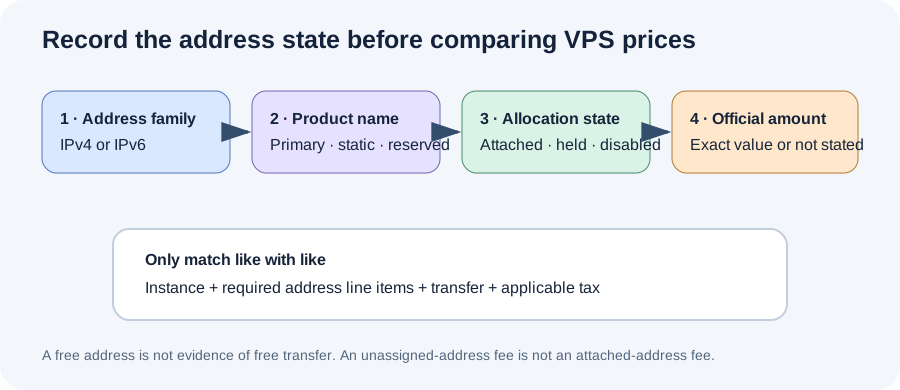
Our public/private address ledger
“Public” and “private” describe reachability and network placement; “primary,” “static,” “reserved,” and “unassigned” describe product or lifecycle states. A price comparison becomes unreliable when those labels are collapsed into a single IP checkbox. We use four fields before recording a cost:
- Address family: copy IPv4 or IPv6 exactly. Do not treat support for one family as evidence of a price for the other.
- Named resource: record the provider’s term, such as Primary IP, Reserved IP, Static IP, or an instance bundle. If the provider does not name a separate address resource, record that the price is bundled or not separately stated.
- Allocation state: record attached, unassigned, disabled, or included with the instance. A fee for an unassigned address cannot be copied onto an attached address.
- Price authority: store the exact official source and its own verification or change date. If an official pricing page cannot be opened, preserve that failure and leave the amount unstated.
This worksheet avoids two opposite mistakes. First, it does not add an optional reserved address to every basic VPS plan. Second, it does not erase a charge that appears only after an address is detached or kept without a server. For each quote, the matching row is the one with the same address product and state—not just the same IP version.
How to compare a public-facing VPS with a private workload
Start with the route your workload needs. A public web endpoint may need a public address family reachable by its users. A database reached only from a provider’s private network may use a private interface instead. A failover design may hold a static or reserved address even while no instance is attached. Those are three different configurations, so write them as separate rows in a quote worksheet.
Then match the plan’s address state to the official billing statement. DigitalOcean’s v5 line item is not the same as its Reserved IPv4 rule. Lightsail’s unattached Static IP charge does not describe the attached state. Hetzner’s Cloud Primary IP price is not its Floating IP price. Akamai’s hourly billing rule for additional IPv4 does not itself provide an amount. The exact price remains blank wherever the pricing page did not state one.
Use this non-numeric reconciliation: configured VPS total = selected compute plan + only the address line items that match the required product and allocation state + applicable transfer + applicable tax. This expression is a comparison method, not a quoted total. It intentionally does not calculate a provider-specific bill from mixed product pages.
Keep address charges separate from network traffic. A provider can publish a zero address fee and still meter transfer under another rule; a reserved address rate does not describe data transfer. Record bandwidth in its own field, and only combine it with an IP charge when both official sources apply to the exact selected product.
What the retained comparison sample shows—and leaves open
In the retained VPS Price Tracker page capture, its search form has separate IPv4 and IPv6 filters, and sampled result cards use labels such as “IPv4 + IPv6” and “IPv6 Only.” That sample makes address-family filtering visible, but it does not show an address-fee field in the captured result descriptions. This page adds the missing comparison dimension for that one saved sample: the provider’s named address product, allocation state, and linked official amount (or an explicit “not stated”). This is an observation about one retained capture, not a claim about all comparison pages or current search results.
To reproduce the distinction on a new quote, preserve the selected address filters, then open the provider’s own price source and record the matching product. Do not infer the fee from the label “IPv4 + IPv6,” and do not call an IPv6-only plan cheaper without comparing the same compute resources and billing term.
Does a private IPv4 address have the same price as a public IPv4?
Not necessarily. The provider and product determine the price. This comparison records public Primary, Reserved, Static, bundle, and instance address states where official pages describe them; it does not assign a public-address fee to a private interface.
Does “free IPv6” mean IPv6 transfer is free?
No such conclusion follows from an address price. An address charge and data transfer are separate line items. Check the bandwidth policy for the same plan and address path before estimating traffic costs.
What should I enter when a pricing page does not state an IPv4 or IPv6 amount?
Write “Not stated on the official pricing page” and keep the source link and review date. Do not substitute a reserved-IP charge, another plan’s bundle total, or a third-party estimate.
Official evidence and review limits
- DigitalOcean Droplet Pricing, IPv6 Details, and Reserved IPs Pricing.
- Hetzner IP Pricing and Primary IP Overview; the IP-pricing page’s own last-change date is April 13, 2023.
- AWS Lightsail Pricing, Lightsail FAQ, and Instance Bundles.
- Vultr Pricing could not be opened by the review fetch on November 11, 2026; configuration context is linked to Vultr’s official instance documentation.
- Akamai Cloud Pricing, billing documentation, and Compute Instance documentation.
All five providers were reviewed on November 11, 2026. No instances were purchased, configured, or billed for this review; no private account, checkout quote, or invoice was accessed. Amounts are limited to the official sources linked in the table. Confirm the provider’s live quote before ordering.
See our provider comparison or return to the VPS Price Watch home page.