How should you compare VPS prices with different billing terms?
Compare the money due for the same service period, then show the payment due today separately. Record the billing term, renewal rate, included resources, and unavoidable extras before treating two advertised monthly rates as comparable. The worksheet below calculates an explicitly chosen ownership period; it does not predict your bill or select a hosting provider.
Your billing worksheet
Enter documented amounts in one currency. Empty inputs remain unknown. This is a service-period calculation, not a checkout quote.
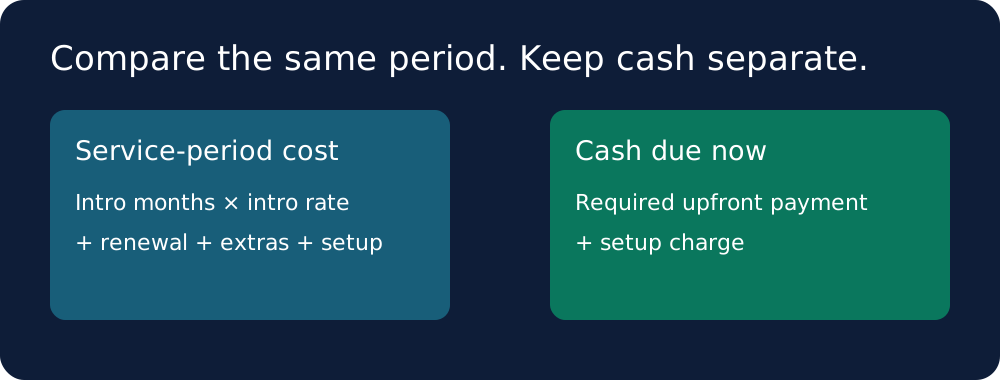
Formula: min(H,T) × intro + max(0,H−T) × renewal + H × extras + setup. Monthly equivalent = service total ÷ H. Cash due now = entered upfront payment + setup; taxes and unentered charges remain outside this calculation.
What the provider pages establish
OVHcloud separates its VPS configurations from optional services on its public VPS page. DigitalOcean separates Droplet pricing and backup options on its public pricing page. These are useful inputs, but a product page does not establish your final checkout total. Follow the linked official sources and record the exact offer you intend to buy. This guide deliberately publishes no unverified provider price.
Our original worksheet: keep two totals
Use two totals because they answer different questions. Service-period cost answers how much of the selected period you pay for. Cash due now answers how much money must leave your account when you order. A prepaid contract can make the first number look smaller while making the second larger. Our worksheet keeps those fields separate, so the headline result cannot hide the initial payment. It accepts your own observed inputs and makes no claim that an introductory rate is available to you.
Record inputs before doing arithmetic
Choose a whole number of months as the comparison horizon. Record the introductory monthly equivalent, the number of months to which it applies, and the renewal monthly equivalent. Separately record any required upfront payment, recurring extras, and one-time setup charge. Copy the source URL, observation date, region, currency, and tax treatment into your notes. If a required field is unknown, leave the comparison incomplete. Do not enter zero to disguise a missing renewal rate. Zero is appropriate only when the relevant charge is confirmed to be absent.
The calculation we implemented
Introductory months equal the smaller of the chosen horizon and the introductory term. Renewal months equal the horizon minus introductory months. Base service cost equals introductory months multiplied by the introductory monthly equivalent, plus renewal months multiplied by the renewal monthly equivalent. Add the recurring extras multiplied by the horizon and the one-time setup charge. Divide that total by the horizon to obtain the service-period monthly equivalent. These are arithmetic transformations of your inputs, not estimates of taxes, usage, exchange rates, or future provider pricing.
Handle prepaid contracts without pretending they are monthly
Enter the quoted upfront payment separately. The service-period calculation apportions the rates across the chosen months, but it does not promise that the provider will sell that shorter term or refund an unused balance. If the order requires a longer commitment than your horizon, show the entire required payment in the cash-due-now field. Read the cancellation conditions before using an apportioned rate to make a purchase decision. This distinction is part of our worksheet design rather than a statement about any particular provider contract.
What we tested, and what we did not
We ran the calculation locally with explicit test fixtures. In the first fixture, the horizon is 12 months, the introductory term is 3 months, the introductory rate is 5, the renewal rate is 8, recurring extras are 2 per month, and setup costs 10. The computed service total is 121 and the monthly equivalent is 121 divided by 12. In the second fixture, the horizon is 6 months and the introductory term is 12 months at a rate of 4, with no extras or setup charge; the computed service total is 24. These fixtures use arbitrary unit amounts created for software verification. They are not provider quotes, currencies, discounts, or observed hosting bills.
Turn the worksheet into a fair comparison
Before comparing the calculated totals, compare the scope of the two offers. Write down memory, storage type and capacity, CPU allocation, region, included transfer, backup retention, and any software licence you need. Mark each required feature as included, separately priced, unavailable, or unknown. A lower total for an offer missing a required feature does not answer the same buying question. Keep the original offer URL alongside each row so that someone else can reproduce the comparison rather than trusting a screenshot of a large headline price.
Does this tell me which VPS is cheapest?
No. It gives an auditable calculation for the offers and requirements you enter. A cheapest-provider claim would require a defined market, current comparable offers, complete fees, and a reproducible selection rule. This page has not conducted that market survey. Use the worksheet to identify missing inputs and compare documented totals within your chosen scope.
What if the renewal price is not published?
Keep the renewal field unknown and obtain a written quote before completing a horizon that extends beyond the introductory term. A shorter horizon can describe the known period, but it does not resolve the cost of renewing. Preserve that limitation in your notes. The calculator rejects empty rate fields so an unknown charge cannot silently become a free service.
Sources and method
Official pages fetched on 2026-10-05. Price figures are intentionally not republished.
The worksheet, comparison workflow, and fixtures were created and tested for VPS Price Watch. Fixture amounts are software test inputs.