Azure VM pricing: keep savings-plan hours separate
Azure VM pricing has no single universal savings-plan price. A discounted compute rate comes with an hourly spending commitment: unused commitment expires within that hour, while eligible usage beyond it is billed at pay-as-you-go rates. Check hourly utilisation before treating the discounted rate as your effective cost. Our isolated synthetic examples show the boundary; they are not Azure quotes, real bills or a recommendation to buy a commitment.
The official hourly boundary
Microsoft documents a fixed hourly commitment and automatic allocation to eligible usage within its scope. The compute plan does not cover software, storage or networking charges. Unused hourly commitment does not carry forward. Its allocation documentation applies benefits to higher-discount eligible usage first and bills subsequent usage at pay-as-you-go rates when commitment is exhausted. This article isolates one meter rather than reproducing all allocation priorities.
Our original isolated-hour worksheet
We separate a commitment field from a discounted rate field, even though both may appear beside a price offer. The first is a spending amount for each hour; the second prices a unit of eligible usage. Our worksheet adds usage and an on-demand rate, then carries the hour identifier through every result. We chose all numerical inputs ourselves in fictional currency units. They are not scraped Azure rates. The worksheet excludes taxes, other meters, negotiated contracts and reservations, and it cannot forecast a customer bill.
Inputs and reproducible formulas
All numeric inputs below are synthetic constants chosen for this worksheet. Official sources establish the rule, not these prices. No server was rented.
Covered units = min(usage, commitment / savings rate). Excess = usage − covered units. Unused commitment = commitment − covered units × savings rate. Model cost = commitment + excess × pay-as-you-go rate. Baseline = usage × pay-as-you-go rate.
| Hour case | Commitment | Usage | Savings rate | Paygo rate | Model cost | Unused |
|---|---|---|---|---|---|---|
| A | 2 | 1 | 1 | 2 | 2 | 1 |
| B | 2 | 3 | 1 | 2 | 4 | 0 |
| C | 2 | 2 | 1 | 2 | 2 | 0 |
| D | 2 | 0 | 1 | 2 | 2 | 2 |
| E | 2 | 3 | 0.5 | 2 | 2 | 0.5 |
Download all inputs, formulas and source hashes · Run the original checker
Case A: a lower rate can leave commitment unused
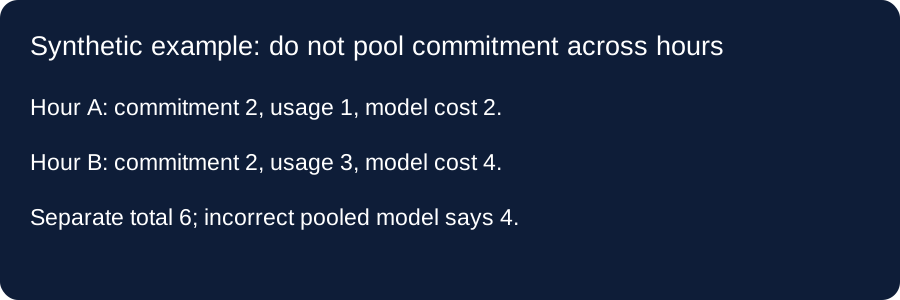
Our first fictional hour sets commitment to two, usage to one, the savings rate to one and the on-demand rate to two. The covered quantity is min of one and two divided by one, which is one. One unit of commitment remains unused, but the model cost remains two. The on-demand-only baseline is also two. In this constructed hour a lower unit rate produces no reduction in the final isolated total. This is an arithmetic counterexample, not a statement about an actual VM size or customer.
Case B: the next hour does not inherit the leftover
We reuse the same chosen rates and commitment but set usage to three. The model covers two units and leaves one excess unit. The result is two plus one times two, or four. Case A left one unit of commitment unused, yet that field is not passed into case B. Preserving this boundary is the purpose of our regression test. A model that adds the previous leftover would change the allocation mechanism. We do not infer that your account has either usage pattern.
Two independent hours versus one pooled calculation
Adding our actual model outputs for cases A and B produces two plus four, or six. An intentionally incorrect pooled control combines commitment into four and usage into four, keeping both rates unchanged. It returns four because it implicitly lets the earlier unused unit cover later usage. The two-unit difference comes entirely from this pooling assumption. Our checker asserts both results to make the error reproducible. These fictional currency totals describe a test, not an estimate of your spending or a measured saving.
Cases C and D: full use and an empty hour
Case C sets usage to two, exactly filling our commitment at the chosen savings rate. Its model cost is two against a fictional on-demand baseline of four. Case D changes usage to zero: the commitment is wholly unused, and the model still returns two while the baseline becomes zero. Keeping these two extremes next to the same rate prevents an average discount label from hiding different utilisation outcomes. We have not averaged them into a promised monthly percentage or assumed that either pattern occurs on your site.
Case E: hold the commitment fixed when testing a rate
Our final fixture changes the selected savings rate to one half, leaving commitment at two and usage at three. Covered usage consumes one and one half units of commitment, so one half remains unused. The total model cost stays two. This test checks that the implementation deducts a discounted usage amount from the commitment rather than treating commitment as a fixed number of VM units. The numbers remain invented test constants. They must not be presented as an Azure sale, advertised discount or actual account quote.
Can a monthly average replace the hourly rows?
Not in this model. The paired-hour control shows why averaging away the boundary can hide expired commitment. Keep each hour separate. For a real Azure account, the documented eligibility and allocation rules, including other benefits, must also be considered; this checker is not a full billing implementation.
What this page cannot establish
No plan was bought, no account usage was read, and no rate was verified for a selected region or VM. Microsoft also documents more complex benefit allocation and reporting behaviour than this isolated model covers. The examples do not decide which commitment you should purchase. They explain one pricing boundary and leave actual contractual and usage inputs unknown.
Official evidence and test provenance
Captured October 11, 2026. Numerical examples are project-authored synthetic fixtures, not official rates.